
Clockwork / clock-in
Clock-in and clock-out by PIN or QR, with every session tied to its shift, project and group and approved before payroll. Can require an ID check before a person's first clock-in.
QR clock-inBuilt with festival, venue and temporary-staffing teams. HR Cluster has two suites on one shared record: Workforce on the crew side, Ops on the production side. First by the problem you're solving, then module by module.
The live layer of the platform. The parts coordinators touch every hour during an event.
Phone, tablet or a shared terminal. PIN, QR or the manager's scanner, with GPS stored whenever the device allows it. Late arrivals and no-shows surface immediately, not at end of week.
Shifts by project, role, group and location. Draft, publish, and cancel with the crew told automatically. Decide per shift who may sign up, and let pending signups hold their seats until you decide.
One group holds each person and answers the payroll question. Roles name the function a shift needs. Departments split the production. Structure that matches how the event is run, not a generic org chart.
Multi-site, multi-event. Keep parallel festivals or venues in one workspace without them bleeding into each other. Crew lists are built and emailed per location.
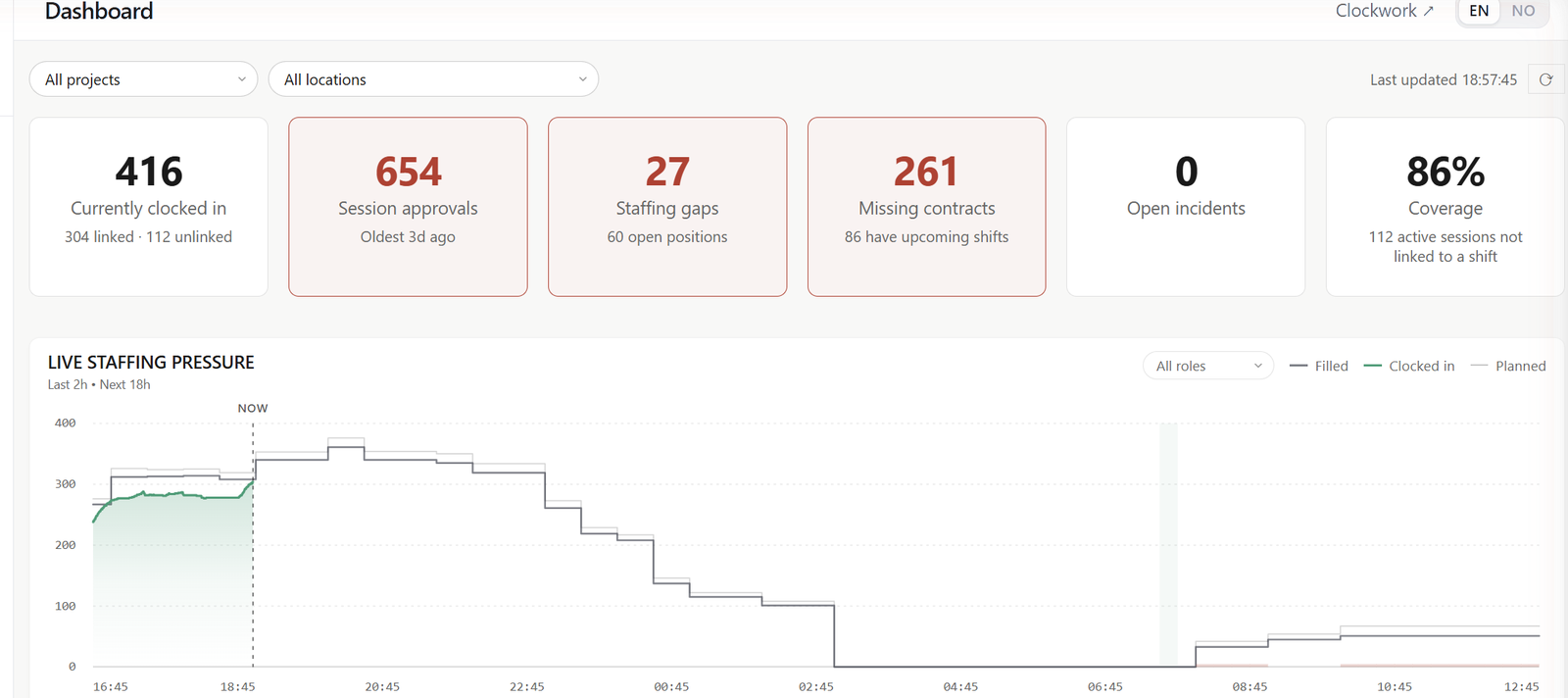
Staffing status, clock-ins, no-shows and everything waiting on a decision. At a glance, as it happens.
A page of their own, on their phone. Upcoming shifts and the ones open for signup, hours worked, PIN and contact details, kept current by the person they belong to. A shift they cannot take says why.
The paperwork side, handled once, at the right time, by the person it actually concerns.
One link to a sign-up form the crew completes in under five minutes. Contracts and certificates follow by link, on the same record.
Generate, send and store contracts inside the platform. Signed copies live on the worker's profile.
Certificates, training, ID docs. With expiry tracking so you don't discover the missing one during an audit.
Scan to clock in, report an incident or start a risk assessment, from posters on the wall. Each crew member also has a personal QR code on their phone.
National ID numbers encrypted at field level, data in the EU, a DPA on request. A person removed from the roster leaves every list while the history behind their hours holds up.
Allergies and dietary needs, recorded by each person on their own page. Ask one person, a group or everyone for an update, see who has not answered, and give catering a summary or the full list as PDF.
The event-day tools, built to work under pressure, on whatever device is in someone's hand.
Near-miss, concern and incident reporting from the field through a public form that needs no login. Each case gets an owner, a priority and a follow-up state, and a summary can be shared with the supplier involved.
Email or SMS to one person or a whole group, or only to those of them on shift right now, with delivery tracked per recipient. Signup confirmations, cancellations and shift reminders go out by email on their own.
Overlapping shifts are blocked and a minimum rest between shifts is enforced on every signup and approval. A manager who assigns past it does so deliberately, and it is recorded.
An assigned person who has not clocked in after their shift started is on the dashboard, with the shift a click away. Not discovered when finance reconciles payroll.
Radios, keys, vests, cash floats. The shift says what it needs, clock-in confirms what went out, clock-out captures what came back, and the person gets a receipt by email. What is still out, by person.
The channel plan for the event, shared by link or download with the people carrying the radios, and an operational contact directory with lists you can send to. Not a laminated sheet somebody lost.
The production side, in the same workspace as the crew. Readiness and live power sit alongside.
Every task and delivery on one dated plan, by department and phase. Plan Live puts it on a screen for the teams who need it, live and read-only, without workspace access.
One delivery movement, one operational record: arrival, driver, vehicle, gate control for that trip. Suppliers and hauliers register their own through a public link, and nothing lands on the plan until you approve it.
A register with Brønnøysund details, documents that expire and a responsible on your side. One link per supplier for their passes, vehicles and deliveries. Everything they send is a proposal you review.
Who is allowed on site and who is here now. Passes issued per type and project phase, or presence tracked at a sign-in desk that always shows who is inside.
Request, review, permit, gate. Access and parking decided separately, per phase and per zone. At the gate, a scan or a plate gives one answer: approved, access only, denied.
Hazards, controls and participants on one record, reviewed and approved before the work starts. Participants confirm they were briefed through a link, and incidents during the event land on the same site structure.
The end of the process. Where spreadsheets usually fall apart.
The dashboard counts it all: signups and shift requests, missing contracts, open incidents, supplier submissions, pending accreditation and vehicle requests. Behind it, the schedule has one Requests inbox.
CSV export to payroll systems. Hours are already reconciled.
Hours per person, contract status, competence with expiry, incident lists. Ready when an auditor asks.
Labour cost by project or group, priced at the hourly rate that applied when the hours were worked. Know the real picture the Monday after the event.
Every session is closed, adjusted or approved. An adjustment keeps the original times and the reason. Approve per group before payroll, unapprove to correct, and the export can take approved hours only.
Planned, filled and clocked-in for any date range, by location, project or role. Coverage and no-show rate per location, so the next event is planned on what happened, not on how it felt.
The platform layer. Access, integrations and the things an IT or finance lead will ask about.
Every module is granted per person as view or manage, on top of admin and manager defaults. Ops is switched on per person. A group's linked contact sees that group and nothing else.
Adjusted hours keep the original times, and access, vehicle, incident and risk records keep a log of what changed and when. Straightforward to explain to an auditor or a customer.
Run several legal entities, brands or festival labels as separate workspaces under one login, without cross-contamination.
Nothing to download from a store. Works on the tablet in the production cabin and on the phone in the crew coordinator's pocket.
Data stays in the EU. DPA available. Security page has the detail.
Crew, shifts, hours, assignments and the production plan come in as CSV, previewed and validated before a row lands. Shifts and hours go back out in the same format, to edit and re-import.
Crew, suppliers and volunteers come and go, and a store download is one more step before every shift. Add HR Cluster to the home screen of a phone, tablet or computer and it opens like an app, without the browser's address bar and with no IT department involved. Updates are delivered automatically, without requiring users to download a new version from an app store.
For managers and crew. The icon opens straight into the workspace, on the phone in a pocket or the laptop in the production office.
Install the PIN screen on an iPad or Android tablet at the entrance and it runs full screen as a clock-in kiosk.
The public incident form installs as an icon of its own, named in the user's language: Incidents in English, Meld avvik in Norwegian. It also works from meldavvik.no.
The SJA form installs as an SJA icon, also from a shared SJA link, so it is one tap away before the next job starts.
Workforce covers the crew side: bringing people in, planning their shifts, recording their hours and keeping their paperwork in order. Ops covers the production side: the plan, suppliers, deliveries, access to the site and risk. Both suites share the same people, projects and locations, and the modules built on them are enabled as each organisation needs them. The capabilities above run across these modules.
The crew side, from the first sign-up to hours ready for payroll.
Clock-in and clock-out by PIN or QR, with every session tied to its shift, project and group and approved before payroll. Can require an ID check before a person's first clock-in.
QR clock-inShifts by role, location, project and group, published to the crew, who sign up for the ones open to them. Signup links take new people from registration straight to choosing shifts.
Event crew onboardingThe teams, clubs, volunteer organisations and supplier crews the crew belongs to, carrying worker type, pay rate and overtime. A named contact can follow their own group's shifts and hours.
Public registration forms that bring new crew in, reviewed before anyone gets an account.
Event crew onboardingEmployment, freelance and volunteer agreements generated from your own templates and signed by link, without logging in.
Event crew onboardingLicences, certificates and courses on each person's record, with proof, approval and expiry.
Allergies and dietary needs recorded by the crew themselves, with meal planning, headcounts and serving times for catering.
Workwear sizes, recorded by the crew themselves and totalled per garment and size, with a list of who is still missing one.
The production side, from the plan to the gate.
Every task and delivery on one dated plan, by department and phase, also used as the daily checklist. Plan Live shows it read-only on a screen for the teams who need it.
Production plan and Plan LiveEvery arrival and return on site as one record, registered by suppliers and hauliers through a link and approved before it lands on the plan.
Production plan and Plan LiveThe companies behind the event, with Brønnøysund company data, documents that expire and one link per supplier for passes, vehicles and deliveries.
Who is allowed on site and who is inside now: access by zone and gate, passes per project phase, and a sign-in desk.
Access and parking permits by phase, zone and gate, checked by scanning the vehicle's QR pass. Norwegian plates are looked up in the Statens vegvesen register.
How the production is organised, from Production and Bar to Rigging and Security. Departments split the plan and decide who receives which morning briefing.
Production plan and Plan LiveSafe job analyses with hazards, controls and participants, approved before the work starts and confirmed by everyone briefed.
One readiness level for the whole account or a single project, from 0 Normal to 3 Critical, always set by a person with a reason. It shows in the workspace header and on Plan Live screens, and the people on the notification lists hear about changes by email or SMS.
ReadinessRadios, keys, vests and cash floats handed out with the shift and brought back at clock-out, with what is still out and who has it.
The event's radio channel plan and operational contact lists, shared as a mobile page people can search and call from.
Live electrical load from the site's connected meters, per phase and against capacity, logged for the project phases you choose and analysed after the event.
The modules share records instead of copying them. In practice:
The crew member who signs up through a form is the one who gets scheduled, signs the contract, clocks in, is handed a radio and ends up in the payroll export.
Rigging, show days and teardown decide which accreditation is issued, which vehicles have access, which part of the plan is showing and when power is logged.
Shifts, accreditation, vehicle permits, incident reports and risk assessments all point to the same locations, zones and gates.
A supplier requests passes, vehicles and deliveries and reports incidents through the same link, and each request lands in the module it belongs to for review.
An incident reported from the field can become a follow-up risk assessment, and an incident form opened from Plan Live arrives with the project, time and place filled in.
A delivery is linked to the plan rows it serves, and scheduled shifts can show up alongside the tasks.
Sign-up, contracts and certificates for hundreds of people before opening day.
Crew scan in, supervisors see who is on site. No app, no card scanners.
One plan for tasks, deliveries and suppliers, and a live screen for the teams who need it.
Production plan, deliveries, suppliers, accreditation and vehicles, in the same workspace.
Thirty minutes with your real event calendar, not a scripted tour.