
Festival workforce management: registration, shifts, clock-in and payroll export
Three weeks out, the sign-up link has brought in most of the crew. Some contracts are still unsigned, every dugnad team wants its own list, and the first build shifts start before everyone has arrived. This page is for the festival that runs its crew in HR Cluster and keeps production logistics where they are today.
Who this is for
Festivals with fixed dates and a crew that is mostly temporary: paid festival workers, dugnad teams from clubs and associations, supplier crews and a small production team. Hundreds of crew, most of them working a few shifts a year, nearly all of them arriving in the same few days. Suppliers, vehicles and the production plan can stay in whatever you run them in now. Nothing on this page needs them.
The flow, in festival order
-
Registration by link
Each crew group can have its own public form. The form sets the group, worker type and rate, and the link and the shift's settings decide which shifts the person can pick, so bar crew, security and riggers each land in the right place without anyone sorting them by hand. Depending on how the form is set up, a submission creates the person or waits for a manager's review. Allergies and certificates go on the same profile.
-
Contracts before the first shift
Employment, freelance and volunteer agreements are generated from your own templates and signed by link, without logging in. A contract signed elsewhere is uploaded as a signed copy. The dashboard counts who has no signed contract and how many of them have shifts ahead, and links to the list, so the chasing happens from one place instead of an inbox.
-
The schedule
Shifts by role, location, project and group, published to the crew. New people pick open shifts on the sign-up link; crew already in the system pick from their own page or send a request where approval is required. The production assigns the rest by hand or imports assignments from CSV. Every assignment, signup, approval and import is checked for overlap across all projects on the account. Rest below the account's minimum stops a self-signup; when a manager assigns directly, it gives a warning they can override.
-
Arrival
With QR clock-in on, each crew member is emailed a code for the shift and shows it on arrival for a manager to scan, or a manager clocks them in. Each session is tied to its shift, project and group when there is one. A person who turns up without a shift can still be clocked in, and appears on the Flagged list while the session is open.
-
The evening
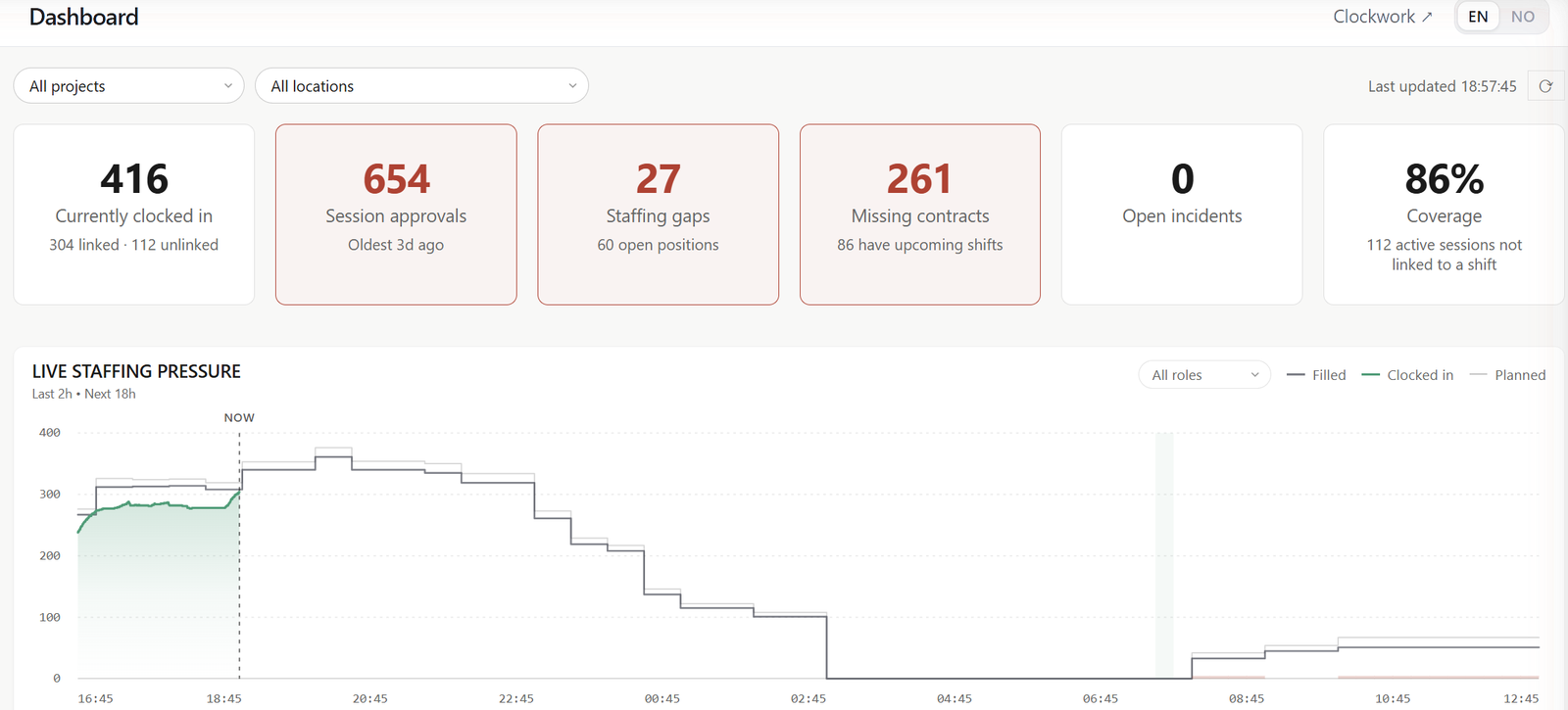
The Workforce dashboard shows who is clocked in, how that matches the plan and where coverage is thin, with a staffing chart two hours back and eighteen ahead. The same screen keeps open positions on upcoming shifts, shifts short of crew and missing contracts in view. The clock-in screens hold the rest: sessions waiting for approval on one tab, and on another the clock-ins without a shift and sessions running past their planned end.
-
Approval and payroll export
Some clock-outs are always missed. A manager corrects a session while the original times stay on record next to the correction. Sessions wait for approval, unless you have turned on automatic approval. The payroll export takes only approved sessions by default, and that choice can be turned off for an export. It is three CSV files (payroll, summary and sessions), downloaded singly or as a ZIP, for the whole crew or for the groups you choose. It is an export, not an integration.
What you need
A Workforce plan. Incidents is included in it, so near misses and concerns reported from the field get a reference and a status from day one, and an owner when someone takes them on. Ops is not needed for anything on this page. Dugnad teams are ordinary groups: a group can be a volunteer organisation with its own default worker type, and can link one contact with a login, who follows that team's members, shifts and hours and can reassign places within the team.
Proof: Sommerbris 2026
Sommerbris is a music festival on Odderøya in Kristiansand. For the June 2026 edition the production planned 1,328 shift places across the build-up, festival days and dismantling. In the final schedule, 883 crew filled 1,230 of them. Of the 1,002 crew who clocked in during June, 162 had no shift assigned that month; their sessions were recorded like any other, with no shift attached. The 47 dugnad teams, 665 crew, each had their own group. By the Saturday, 850 contracts were signed. All 1,875 June sessions have since been approved.
Planned and filled shift places cover 3 to 16 June: the build-up, festival days and dismantling. A shift place is one person's place on a shift, so a shift for ten has ten places. Filled is the final schedule. Crew clocked in counts the different people who clocked in on the project in June. 416 is the Workforce dashboard's live value on the evening of Saturday 13 June. Sommerbris 2026 was the only project in the workspace in June, so the "All projects" view in the screenshots shows Sommerbris alone.
In more detail
See it on your own operation.
Tell us how your events run and we'll show the flow on your real crew size and calendar.